Make a PDF Fillable Online
Upload any flat PDF, scanned form, or Word export — AI detects text boxes, checkboxes, and comb fields in seconds, free to preview without Acrobat.
Upload your form
Choose a PDF, a Word file or an image from your files, or photograph a paper form.
PDF, Word (.docx, .doc), JPG, PNG, WebP, HEIC, GIF and BMP. Instant field preview in browser, no credit card required.
Free: upload, auto-detect fields, fill & preview online. First manual PDF free without a watermark (up to 5 pages with fields). Clean PDF export: $7 7-day pass (one-time, no subscription; 25 clean PDF pages + 25 AI credits, $7 credited toward $19/mo Starter).
By uploading, you confirm you have the legal right to use this document.
Free AI preview · Interactive PDF export included in the $7 7-day pass (25 clean pages, PDFs up to 25 pages), Starter ($19/month, up to 50 pages/PDF, cancel anytime), Pro ($49/month), Business ($99/month) and Scale ($249/month).
Free preview detection on your own PDF (up to 15 pages/PDF) so you can verify every detected text box, checkbox, and comb field live on screen before paying.
No subscription: 25 clean PDF pages + 25 AI credits for filled or interactive PDFs up to 25 pages (100% of $7 credited toward Starter $19/mo → $12 first month or Pro $49/mo).
Choose the $7 passInteractive AcroForm Fillable PDF export up to 50 pages/PDF (up to 10,000 fields), 200 clean output pages/mo, 25 saved reusable templates, hosted e-sign links & 25-row Excel/CSV batch fill.
Interactive Fillable PDF export with no 50-page limit (up to 10,000 fields), 750 clean output pages/mo, 400-row Excel/CSV batch fill, Multi-PDF Form Packets & REST API. Cancel anytime in 1 click.
Build and preview fields free. Interactive PDF export is included in the $7 7-day pass (25 clean pages, PDFs up to 25 pages), Starter ($19/month, up to 50 pages/PDF, cancel anytime), Pro ($49/month), Business ($99/month) and Scale ($249/month).
No credit card. No software to install.
Download the source and the result
A real flat PDF converted to a fillable form
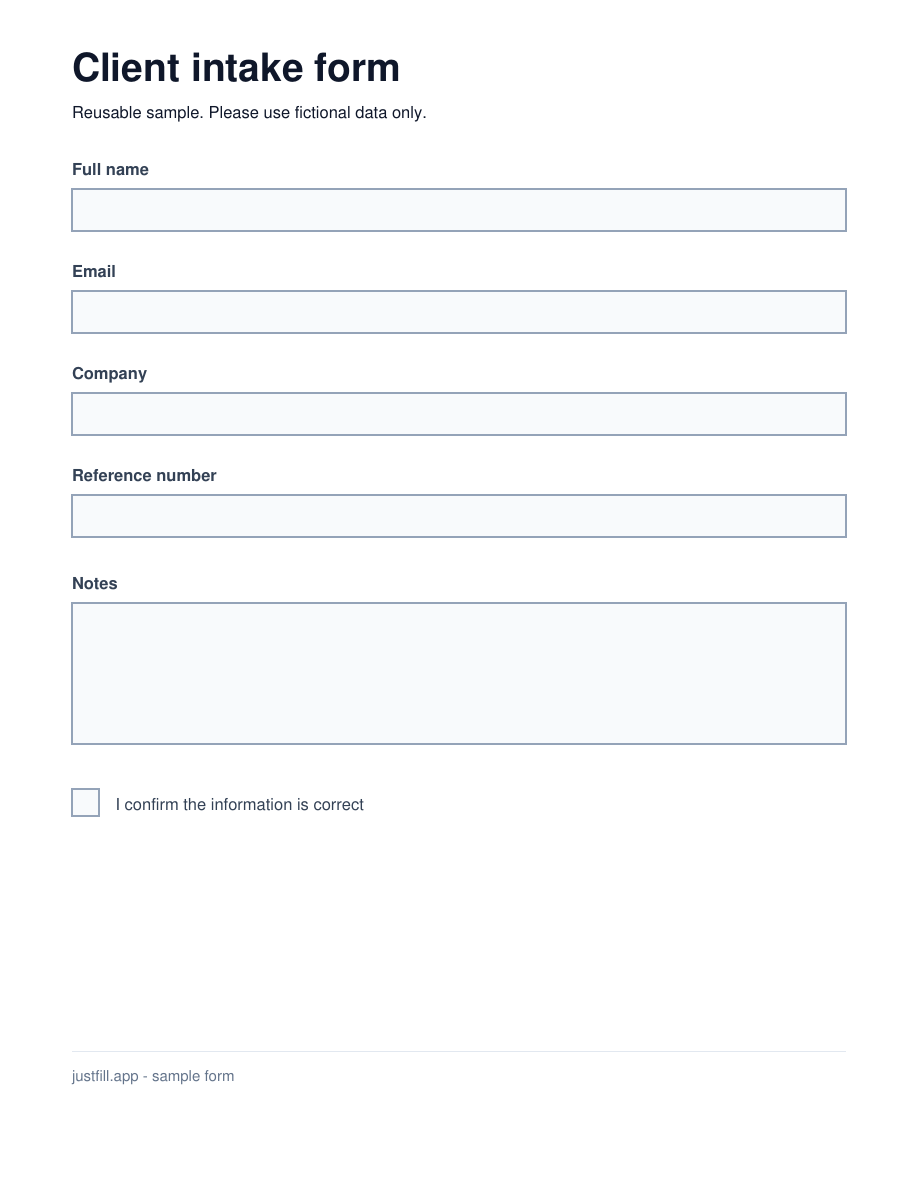
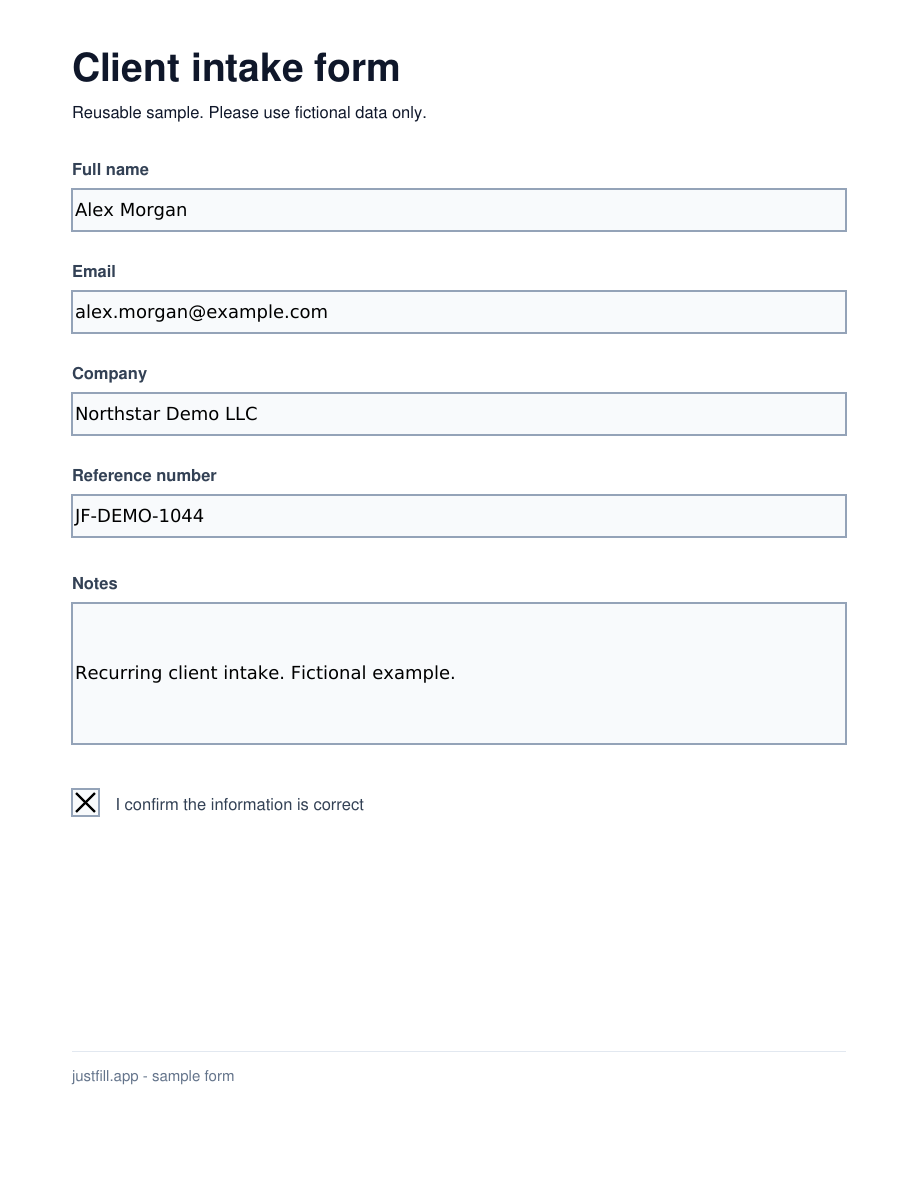
This client intake starts with no interactive fields. We manually positioned five text fields and one checkbox, then exported it through JustFill. Download the blank fillable result to try typing into it, or inspect the completed copy with fictional Alex Morgan data.
Try the same form
These sample downloads need no account. To convert your own PDF, build and preview fields free; exporting interactive fields is included in the $7 7-day pass (25 clean pages, PDFs up to 25 pages), Starter ($19/month, up to 50 pages/PDF, cancel anytime), Pro ($49/month), Business ($99/month) and Scale ($249/month).
Create a blank form for your recipient
- Open the flat sample above, or upload your own PDF.
- Draw the fields, or use Detect Layout within your account's allowance. Review every position and field type.
- Leave answers empty, open Download options and choose "Make it fillable" (or "Download as fillable PDF" for an existing interactive form). Use a compatible viewer such as Adobe Acrobat Reader to test typing, checking and saving.
Reuse it for your next client
Keep the blank fillable PDF as your master and send a fresh copy for each client. Your recipient can complete the exported file without a JustFill account. When you prepare the same form repeatedly in JustFill, save the reviewed layout in your account and reuse it for new values. Monthly plans add recurring processing and clean-output capacity.
Have a spreadsheet of clients? Fill PDF from Excel or CSV (one PDF per row).Watch the setup, then reuse it
Follow the real editor walkthrough: draw the fields on this blank source, save the layout, and prepare separate copies for two fictional clients. The 1:26 tutorial has on-screen instructions and English captions.
How to Make a PDF Fillable Free & Create a Fillable PDF Free in 6 Steps
Build and review fields free on a scanned form or a document from Word. Export clickable AcroForm PDFs with Starter ($19/month, 200 clean pages/mo, up to 50 pages/PDF, cancel anytime), Pro ($49/month, 750 clean pages/mo, 400-row batch) or Business ($99/month, 3,500 clean pages/mo) — or export a single flat filled PDF up to 25 pages with the one-time $7 7-Day Pass (no subscription; 100% credited toward Starter or Pro).
Upload Your PDF
Open JustFill and upload any PDF — a scanned paper form, a document exported from Word or Excel, or even a photo of a printed form. JustFill renders it in your browser so nothing is uploaded until you choose to process it.
Create Fillable Fields
Use the Draw tool to click and drag rectangles over every area that needs to be filled in. Name, address, date, signature line — just draw a box where each one goes. This is completely free and takes a few minutes for most forms.
Or Let AI Detect Fields Automatically
Click "Detect Layout" with fair-use limits to create fields automatically. It detects input lines, checkboxes, text areas, and table cells — even on scanned documents. Paid plans add recurring capacity, and you can adjust every field.
Fill In Your Data
Type directly into each field, or paste all your data at once and let AI map values to the right fields. You can also dictate data by voice. Every field is draggable and resizable so you can fine-tune placement.
Choose Your PDF Output
Download a flattened filled PDF when you want the entered values baked into the page (covered by the one-time $7 7-Day Pass for 25 clean flat PDF pages up to 25 pages; 100% of $7 credited toward Starter $19/mo → $12 first month or Pro $49/mo). Export an interactive AcroForm Fillable PDF so recipients can click and type in any PDF viewer on Starter ($19/month, up to 50 pages/PDF, cancel anytime), Pro ($49/month) or Business ($99/month).
Save as a Reusable Template
Save the reviewed layout as a template in your JustFill account. Keep the original blank PDF as your master and reopen that same file for the next set of values. Review before exporting each completed form; monthly plans add recurring processing and clean-output capacity.
Filling this form for 10, 50, or 2,500 clients? Don't type it one by one.
Once JustFill detects or creates your form fields, save 25–200 reusable templates, share hosted client e-sign links (justfill.app/f/…), or import an Excel (.xlsx) or CSV spreadsheet to generate up to 400 filled PDFs per batch on Pro (1,000 rows on Business) in a ZIP.
Make Scanned PDFs, Camera Photos & Flat Image PDFs Fillable
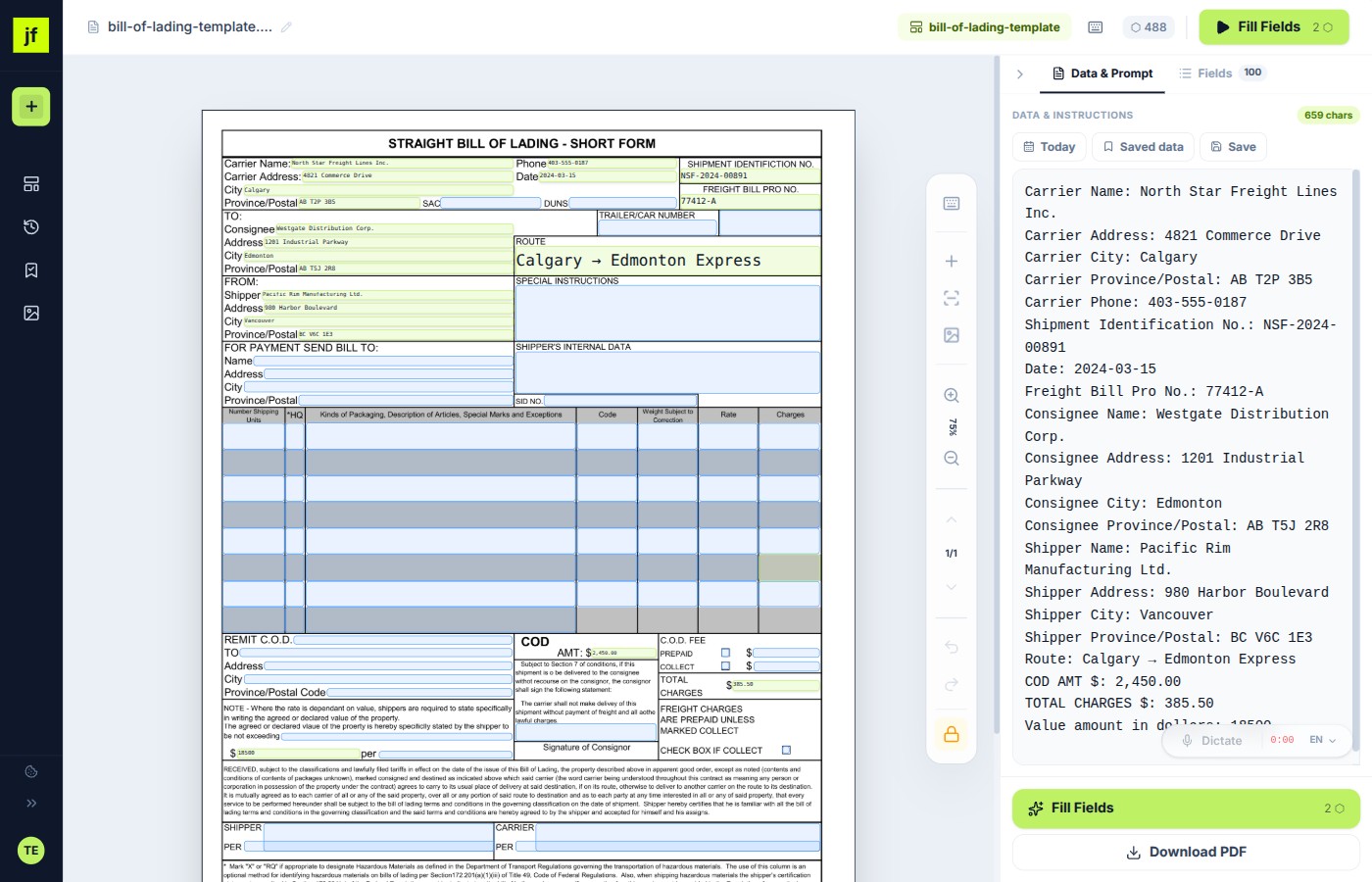
Most PDF form builders fail on scanned paper forms, faxes, and smartphone photos because the file has zero embedded text characters (textChars === 0). JustFill turns image-only PDFs into interactive forms without breaking your layout:
1. D-FINE Visual Detection on Image PDFs
Our D-FINE visual detector inspects the rendered page image to find underscores, input boxes, table cells, and checkboxes even when textChars === 0.
2. Place or Adjust Fields in 1 Click
Add a missing text field, checkbox, or signature block in 1 click, or drag and resize any detected field so your answers sit cleanly on the original scan.
3. Export Clean Filled or AcroForm PDF
For clickable fields or a clean filled copy, choose the $7 pass for PDFs up to 25 pages. Starter ($19/month) covers PDFs up to 50 pages and includes reusable templates.
Ways to Make a PDF Fillable Free — Compared
There are several ways to make a PDF fillable free or build a PDF fillable form free online. Here's how they stack up.
| Method | Difficulty | Cost | Works with scans | Flat PDF support | From Word/Excel | Reusable templates | AI field detection | No install needed |
|---|---|---|---|---|---|---|---|---|
| JustFill (Online) | Easy | Free preview / $19/mo Starter | ||||||
| Adobe Acrobat Pro | Medium | $19.99/mo (annual) | ||||||
| LibreOffice Draw | Hard | Free | ||||||
| Google Docs | Medium | Free |
Common Scenarios to Create a Fillable PDF Free
No matter where your PDF comes from, JustFill makes it a free fillable PDF in your browser.
Make a Word Document Fillable as PDF
Export your Word file as PDF, upload to JustFill, and draw or auto-detect fillable fields. Faster than using Word's developer tools to add form controls, and the result works on any device.
Make an Excel Spreadsheet Fillable as PDF
Save your Excel sheet as PDF, then add fillable fields with JustFill. Perfect for order forms, timesheets, and data collection sheets where you need a clean, non-editable layout with specific fill areas.
Make a Scanned Paper Form Fillable
Scan your paper form (or photograph it) and save as PDF. JustFill works with scanned images — draw fields over the scanned areas or let AI detect them. No OCR setup required.
Make a Government or Tax Form Fillable
Downloaded a PDF from a government website that isn't interactive? Upload it to JustFill, create fields once, save as a template, and reuse it every time you need to fill the same form.
Make a PDF Fillable on Mac
JustFill runs in your browser — Safari, Chrome, or Firefox on macOS. No need to install Adobe Acrobat or any other desktop software. Upload your PDF and start creating fillable fields immediately.
Make a PDF Fillable on Your Phone
Need to make a PDF fillable from your iPhone or Android? JustFill works on mobile browsers. Upload the PDF, draw fields with your finger, fill in data, and download — all from your phone.
Create a Fillable PDF Free from Word
Have a document in Microsoft Word that you need as a fillable PDF? Export it as a PDF (File → Save As → PDF), then upload it to JustFill. Draw fillable fields on the document or let AI detect them automatically. This is faster and more reliable than using Word's built-in developer form controls, and the result works on every device and operating system.
Creating a PDF fillable form free from Word takes minutes with JustFill's Draw tool. You can save the field layout as a reusable template so you never have to set up the same form twice.
Make a PDF Fillable Free: Build a PDF Fillable Form Free
Whether you have a flat PDF, a scanned paper form, or an intake sheet downloaded from the web, JustFill lets you make a PDF fillable free and preview your field layout in the browser. Download a flattened filled result when the values should be final. An interactive AcroForm that stays editable for its recipient is included in the $7 7-day pass (25 clean pages, PDFs up to 25 pages), Starter ($19/month, up to 50 pages/PDF, cancel anytime), Pro ($49/month), Business ($99/month) and Scale ($249/month).
Need a dedicated converter for legacy or scanned documents? Use our Scanned PDF to Fillable Form tool to turn static files into interactive AcroForms.
How to Make a PDF Editable
"Editable" means two different things, and which one you want changes what you should do next.
You want to type on it
This is what most people mean by making a PDF editable: you have a form, you need your answers on it, and the file won't let you click anywhere. You don't need to rebuild the document — you need fields on top of it. Upload the PDF, draw a box where each answer goes (or let AI place them), type, and download. The layout of the original never changes.
You want to rewrite the text
Changing a typo in the printed body text of a PDF is a different job — that means converting the page back into editable text, which reflows the layout and often breaks the formatting of a form. If you are working with a form rather than a document, editing on top of it is almost always what you actually want, and it keeps the original intact for whoever receives it.
Turning a Scanned PDF Into an Editable PDF
A scan is a picture of a page, so there is nothing in the file to click — which is why most editors refuse to open it as a form. JustFill works on the image itself: fields sit on top of the scan at the coordinates you (or the AI) put them, so a photographed or scanned form becomes editable without OCR, without cleanup, and without retyping the document first.
The same applies to a PDF exported from Word or Excel, a fax, or a form someone printed and re-scanned. If you can see it, you can put a field on it.
Creating an Editable PDF Others Can Fill
If you are sending the form out rather than filling it in, you want the fields to survive the trip. Export as an interactive AcroForm and the file arrives with real clickable fields that your recipient can complete in a compatible PDF viewer — no JustFill account needed on their end.
Build and preview the layout for free. Interactive PDF export is included in the $7 7-day pass (25 clean pages, PDFs up to 25 pages), Starter ($19/month, up to 50 pages/PDF, cancel anytime), Pro ($49/month), Business ($99/month) and Scale ($249/month).
Free vs. Paid: What Do You Need?
Free Plan
$0 / forever
- Upload any PDF (scanned, flat, Word export)
- Draw fields manually + AI field detection (15 pages/mo)
- Type or paste data into fields and preview live in browser
- 1-page watermarked fillable sample (once per account) + 5-row batch sample
- Inspect all detected fields (up to 15 pages/PDF) before paying
- No credit card required — upgrade anytime to a $7 one-time pass or monthly plan
Best for testing AI field detection on your own PDF before exporting.
Paid Options
$7 once or from $19/month
- Everything in Free, plus:
- Starter ($19/mo): 200 clean pages/mo + interactive Fillable PDF export (up to 50 pages/PDF), 25 reusable templates & batch fill (up to 25 records)
- Pro ($49/mo): 750 clean pages/mo + interactive Fillable PDF export (50+ pages), Multi-PDF Form Packets & batch fill (up to 400 records)
- Business ($99/mo): 3,500 clean pages/mo + 200 reusable templates, interactive Fillable PDF export & batch fill (up to 1,000 records)
- $7 7-Day Pass (one-time, no subscription): 25 clean PDF pages + 25 AI credits for filled or interactive PDFs up to 25 pages (100% credited toward Starter or Pro)
- Hosted Share & E-Sign links (justfill.app/f/…) & AI auto-mapping of data to fields
Best for high-volume form processing or complex layouts.
Frequently Asked Questions
Related Guides
How to Create a Fillable PDF
Every method compared — browser tool, Acrobat Pro, LibreOffice, Mac, Word and scans — with a checklist before you send the form.
Free PDF Form Filler
Upload, draw fields, type, and preview your completed PDF live in browser for free.
Convert PDF to Fillable Form
Turn any flat PDF export into a standard interactive AcroForm with clickable text boxes and checkboxes.
Make Fillable PDF from Word
Upload a DOCX or Word-exported PDF and convert blank lines into clickable fields.
Best Fillable PDF Creators (2026)
Side-by-side comparison of browser and desktop fillable PDF form builders on scan support and pricing.
Fill PDF from Excel or CSV
Batch-populate any fillable or flat PDF template from Excel or CSV rows into a single ZIP.
How to Create a Fillable Form in Word
Why Word Developer tab controls flatten on PDF export and how to turn a Word layout into an AcroForm.
Fillable PDF in Adobe Acrobat
How Acrobat Prepare Form works and when a browser AI form builder is faster.
Create a Fillable PDF on Mac
Why macOS Preview only fills existing fields and how to add real AcroForm fields on Mac.
Google Docs to Fillable PDF
Export your layout from Google Docs as PDF and add interactive form fields in minutes.
Make a Canva PDF Fillable
Keep your Canva design intact and place clickable text and checkbox fields on top.
Add Checkboxes & Text Fields
Place interactive checkboxes, text boxes, and signature fields on any static PDF.
Preparing fillable PDFs for clients? See how freelancers and agencies use JustFill.
Comparing tools first? See the best fillable PDF creators compared · Make PDF Fillable Without Adobe.
For business teams: turn recurring PDFs into reusable workflows
Excel → Existing PDF
Turn each spreadsheet row into one reviewed PDF and export the approved records as a ZIP.
Vendor Packet Automation
Automate vendor onboarding, supplier setup, and customer account PDFs.
Logistics Packet Automation
BOL, CMR, customs and freight packet workflows for forwarders and 3PLs.
Microsoft Excel Add-in
Detect fields on flat or scanned PDFs and batch-fill up to 2,500 rows directly from Microsoft Excel.
Class-Action & Claim Forms
Bulk-fill settlement claim forms with Claim IDs, character boxes, and signatures from Excel/CSV.
PDF Comb / Character Boxes
Split SSNs, EINs, Claim IDs, and dates automatically into individual character cells (1 letter per box).
Build your first PDF form — free.
Upload any document and preview detected fields free in minutes. Export clickable AcroForm PDFs with Starter ($19/mo, 200 clean pages/mo, up to 50 pages/PDF · cancel anytime in 1 click), Pro ($49/mo, 750 clean pages/mo, 400-row batch) or Business ($99/mo, 3,500 clean pages/mo) — or export a clean flat filled PDF up to 25 pages with the one-time $7 7-Day Pass.
Upload your form
Choose a PDF, a Word file or an image from your files, or photograph a paper form.
PDF, Word (.docx, .doc), JPG, PNG, WebP, HEIC, GIF and BMP. Instant field preview in browser, no credit card required.
Free: upload, auto-detect fields, fill & preview online. First manual PDF free without a watermark (up to 5 pages with fields). Clean PDF export: $7 7-day pass (one-time, no subscription; 25 clean PDF pages + 25 AI credits, $7 credited toward $19/mo Starter).
By uploading, you confirm you have the legal right to use this document.
Free account. No credit card required. GDPR compliant.