Make a PDF Fillable for Free
Create a fillable PDF form or convert any PDF to a fillable form — scanned documents, Word exports, Excel spreadsheets, or flat PDFs. Build and preview fields free online on any device.
By uploading, you confirm you have the legal right to use this document.
Flattened filled PDF: first clean export free, then one-off packs. Interactive PDF with clickable AcroForm fields: Starter.
No credit card. No software to install.
How to Create a Fillable PDF Form in 6 Steps
Whether you have a scanned paper form or a document from Word — here's how to create a fillable PDF for free.
Upload Your PDF
Open JustFill and upload any PDF — a scanned paper form, a document exported from Word or Excel, or even a photo of a printed form. JustFill renders it in your browser so nothing is uploaded until you choose to process it.
Create Fillable Fields
Use the Draw tool to click and drag rectangles over every area that needs to be filled in. Name, address, date, signature line — just draw a box where each one goes. This is completely free and takes a few minutes for most forms.
Or Let AI Detect Fields Automatically
Click "Detect Layout" with fair-use limits to create fields automatically. It detects input lines, checkboxes, text areas, and table cells — even on scanned documents. Paid plans add recurring capacity, and you can adjust every field.
Fill In Your Data
Type directly into each field, or paste all your data at once and let AI map values to the right fields. You can also dictate data by voice. Every field is draggable and resizable so you can fine-tune placement.
Choose Your PDF Output
Download a flattened filled PDF when you want the entered values baked into a document that opens in any viewer. Your first clean result is free, and a one-time pack unlocks more clean outputs. The same pack also unlocks "Download as fillable PDF" when the recipient must be able to click and edit real AcroForm fields; monthly plans add recurring capacity and reusable templates.
Save as a Reusable Template
Save your field layout as a template so you never have to set up fields again. Next time you need to fill the same form type, upload the new PDF, paste your data, and download — the fields are already positioned.
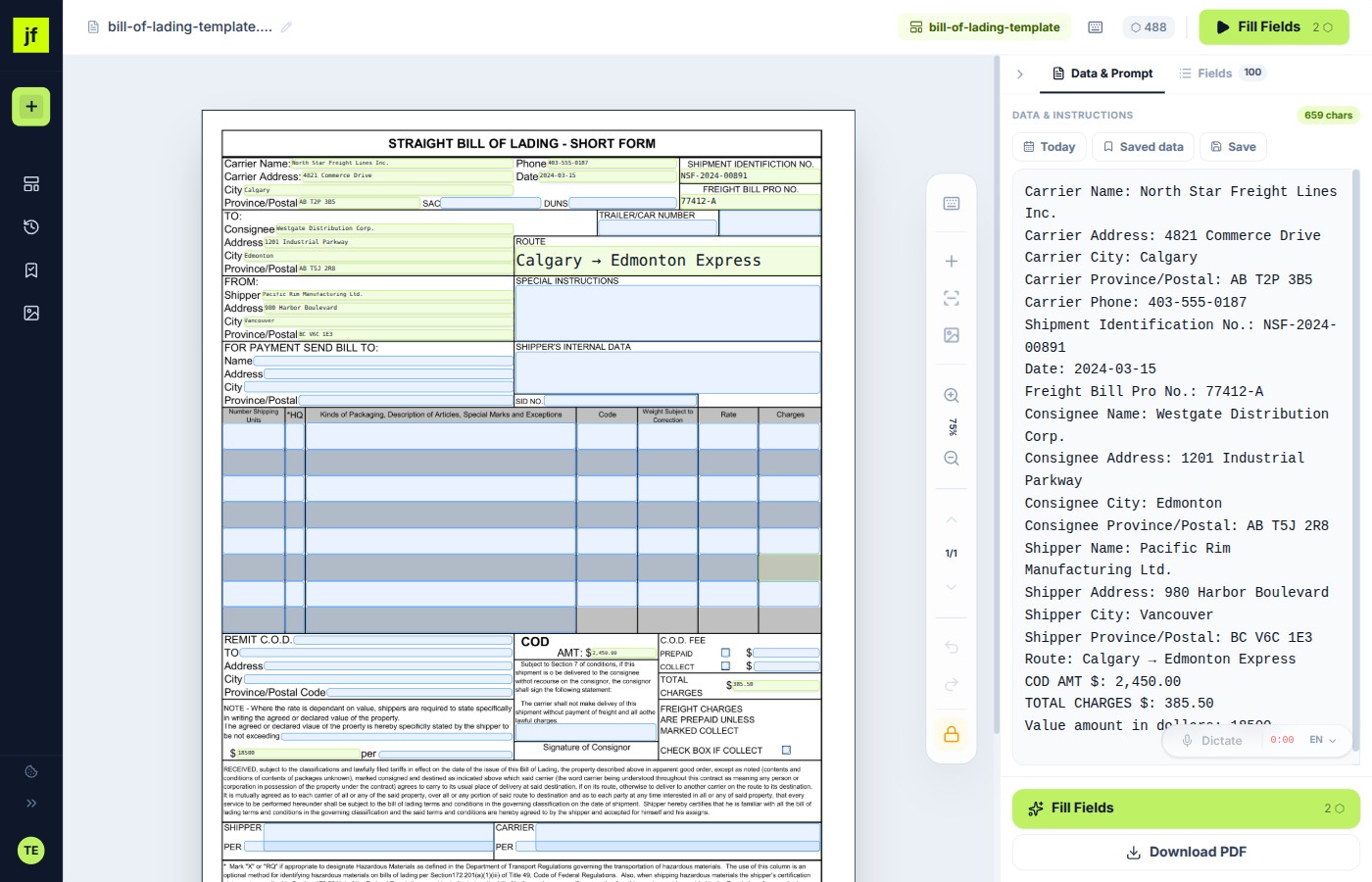
Ways to Make a PDF Fillable — Compared
There are several ways to create a fillable PDF form or convert a PDF into a fillable form. Here's how they stack up.
| Method | Difficulty | Cost | Works with scans | Flat PDF support | From Word/Excel | Reusable templates | AI field detection | No install needed |
|---|---|---|---|---|---|---|---|---|
| JustFill (Online) | Easy | Free / from $19 | ||||||
| Adobe Acrobat Pro | Medium | $19.99/mo (annual) | ||||||
| LibreOffice Draw | Hard | Free | ||||||
| Google Docs | Medium | Free |
Common Scenarios
No matter where your PDF comes from, JustFill makes it fillable.
Make a Word Document Fillable as PDF
Export your Word file as PDF, upload to JustFill, and draw or auto-detect fillable fields. Faster than using Word's developer tools to add form controls, and the result works on any device.
Make an Excel Spreadsheet Fillable as PDF
Save your Excel sheet as PDF, then add fillable fields with JustFill. Perfect for order forms, timesheets, and data collection sheets where you need a clean, non-editable layout with specific fill areas.
Make a Scanned Paper Form Fillable
Scan your paper form (or photograph it) and save as PDF. JustFill works with scanned images — draw fields over the scanned areas or let AI detect them. No OCR setup required.
Make a Government or Tax Form Fillable
Downloaded a PDF from a government website that isn't interactive? Upload it to JustFill, create fields once, save as a template, and reuse it every time you need to fill the same form.
Make a PDF Fillable on Mac
JustFill runs in your browser — Safari, Chrome, or Firefox on macOS. No need to install Adobe Acrobat or any other desktop software. Upload your PDF and start creating fillable fields immediately.
Make a PDF Fillable on Your Phone
Need to make a PDF fillable from your iPhone or Android? JustFill works on mobile browsers. Upload the PDF, draw fields with your finger, fill in data, and download — all from your phone.
Create a Fillable PDF Form from Word
Have a document in Microsoft Word that you need as a fillable PDF? Export it as a PDF (File → Save As → PDF), then upload it to JustFill. Draw fillable fields on the document or let AI detect them automatically. This is faster and more reliable than using Word's built-in developer form controls, and the result works on every device and operating system.
Creating a PDF fillable form from Word is completely free with JustFill's Draw tool. You can save the field layout as a reusable template so you never have to set up the same form twice.
Convert Any PDF to a Fillable Form
Whether you have a flat PDF, a scanned paper form, or a government document downloaded from the web, JustFill lets you build and preview a field layout for free. Download a flattened filled result when the values should be final, or use Starter to export an interactive AcroForm that stays editable for its recipient.
Making a form-fillable PDF takes just a few minutes. JustFill handles scanned images, multi-page documents, and complex table layouts. Fair-use AI detection can position fields automatically; paid plans add recurring monthly capacity.
How to Make a PDF Editable
"Editable" means two different things, and which one you want changes what you should do next.
You want to type on it
This is what most people mean by making a PDF editable: you have a form, you need your answers on it, and the file won't let you click anywhere. You don't need to rebuild the document — you need fields on top of it. Upload the PDF, draw a box where each answer goes (or let AI place them), type, and download. The layout of the original never changes.
You want to rewrite the text
Changing a typo in the printed body text of a PDF is a different job — that means converting the page back into editable text, which reflows the layout and often breaks the formatting of a form. If you are working with a form rather than a document, editing on top of it is almost always what you actually want, and it keeps the original intact for whoever receives it.
Turning a Scanned PDF Into an Editable PDF
A scan is a picture of a page, so there is nothing in the file to click — which is why most editors refuse to open it as a form. JustFill works on the image itself: fields sit on top of the scan at the coordinates you (or the AI) put them, so a photographed or scanned form becomes editable without OCR, without cleanup, and without retyping the document first.
The same applies to a PDF exported from Word or Excel, a fax, or a form someone printed and re-scanned. If you can see it, you can put a field on it.
Creating an Editable PDF Others Can Fill
If you are sending the form out rather than filling it in, you want the fields to survive the trip. Export as an interactive AcroForm and the file arrives with real clickable fields that your recipient can complete in any PDF viewer — no JustFill account needed on their end.
Build and preview the layout for free. A one-time pack unlocks interactive AcroForm export without a subscription; monthly plans add reusable templates and recurring capacity. A flattened download bakes the values in instead, which is what you want when the answers are final.
Free vs. Paid: What Do You Need?
Free Plan
$0 / forever
- Upload any PDF (scanned, flat, Word export)
- Draw fields manually + AI field detection
- Type or paste data into fields
- First clean flattened download free
- One-off packs for more flattened filled PDFs
- Save field layouts as templates
Best when you fill and finalize occasional PDFs yourself.
Paid Plans
from $19 / month
- Everything in Free, plus:
- 125 clean output pages/month on Starter
- Interactive AcroForm export with clickable fields
- AI auto-mapping of data to fields
- Voice dictation (multi-language)
- Priority processing
Best for high-volume form processing or complex layouts.
Frequently Asked Questions
Related Guides
Free PDF Form Filler
Upload, draw fields, and type for free. Your first clean download has no watermark.
How to Fill PDF Form Free
Step-by-step guide to filling any PDF form directly in your browser, no software needed.
How to Make a PDF Fillable
Every method compared — browser tool, Acrobat Pro, LibreOffice, Mac, Word and scans — with a checklist before you send the form.
For business teams: turn recurring PDFs into reusable workflows
Excel → Existing PDF
Turn each spreadsheet row into one reviewed PDF and export the approved records as a ZIP.
Vendor Packet Automation
Automate vendor onboarding, supplier setup, and customer account PDFs.
Logistics Packet Automation
BOL, CMR, customs and freight packet workflows for forwarders and 3PLs.
Make your first PDF fillable — free.
Upload any document and create fields in minutes. Preview for free, download a flattened filled result, or use Starter when recipients need clickable fields.
Free account. No credit card required. GDPR compliant.