Convert any PDF to a fillable form
Upload a scanned form, a Word export, or a flat PDF. Review detected fields or draw your own, then save the blank layout for your next client. No software to install.
Upload your form
Choose a PDF, a Word file or an image from your files, or photograph a paper form.
PDF, Word (.docx), JPG, PNG, WebP, HEIC, GIF and BMP. Free account required, no credit card.
Your first download is free, with no watermark. After that: a watermark, or a $7 one-time pack (5 clean PDF downloads + 25 AI credits). AI detection covers up to 15 pages per run.
By uploading, you confirm you have the legal right to use this document.
Build, preview, and test a watermarked interactive sample free. Clean interactive AcroForm export: included in Starter ($19/month).
No credit card. No software to install.
See the real before-and-after PDF exampleDownload the source and the result
A real flat PDF converted to a fillable form
This client intake starts with no interactive fields. We manually positioned five text fields and one checkbox, then exported it through JustFill. Download the blank fillable result to try typing into it, or inspect the completed copy with fictional Alex Morgan data.
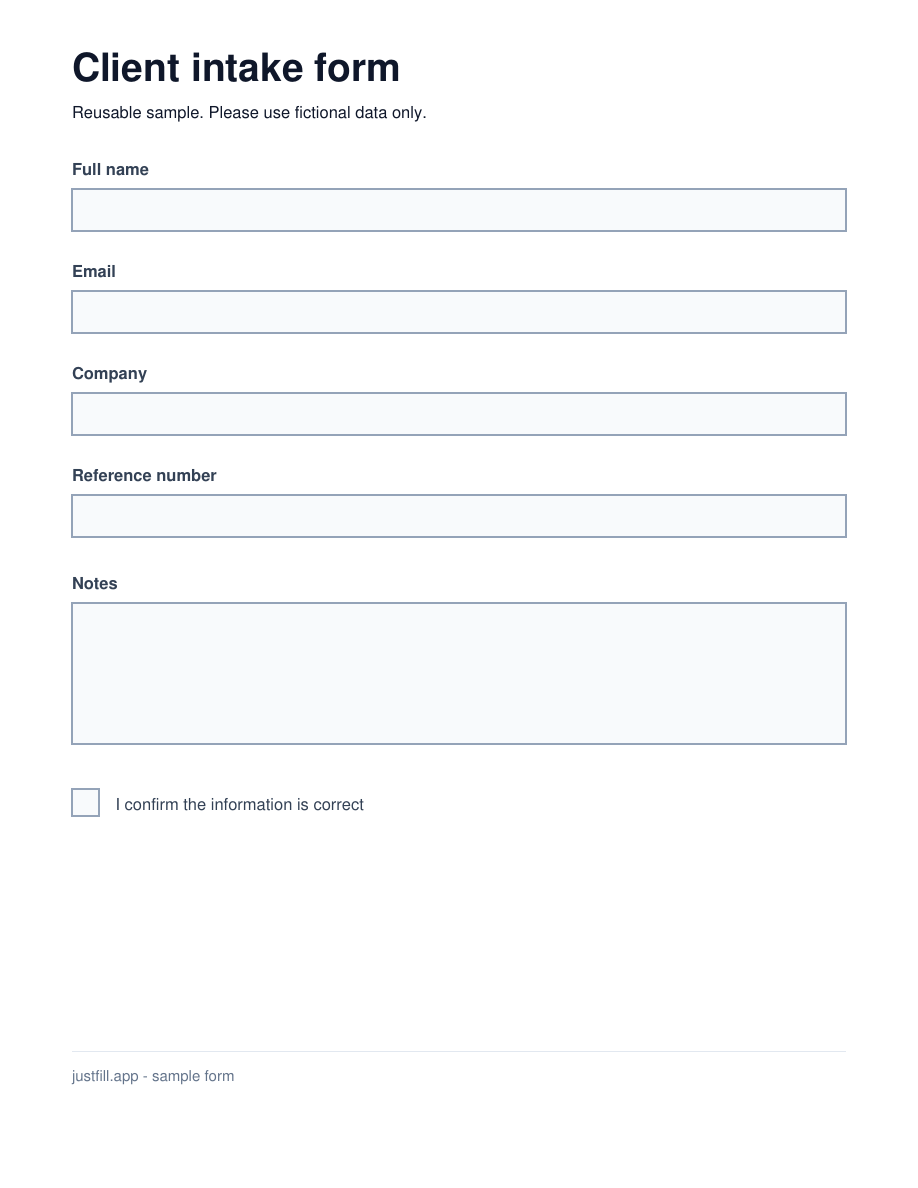
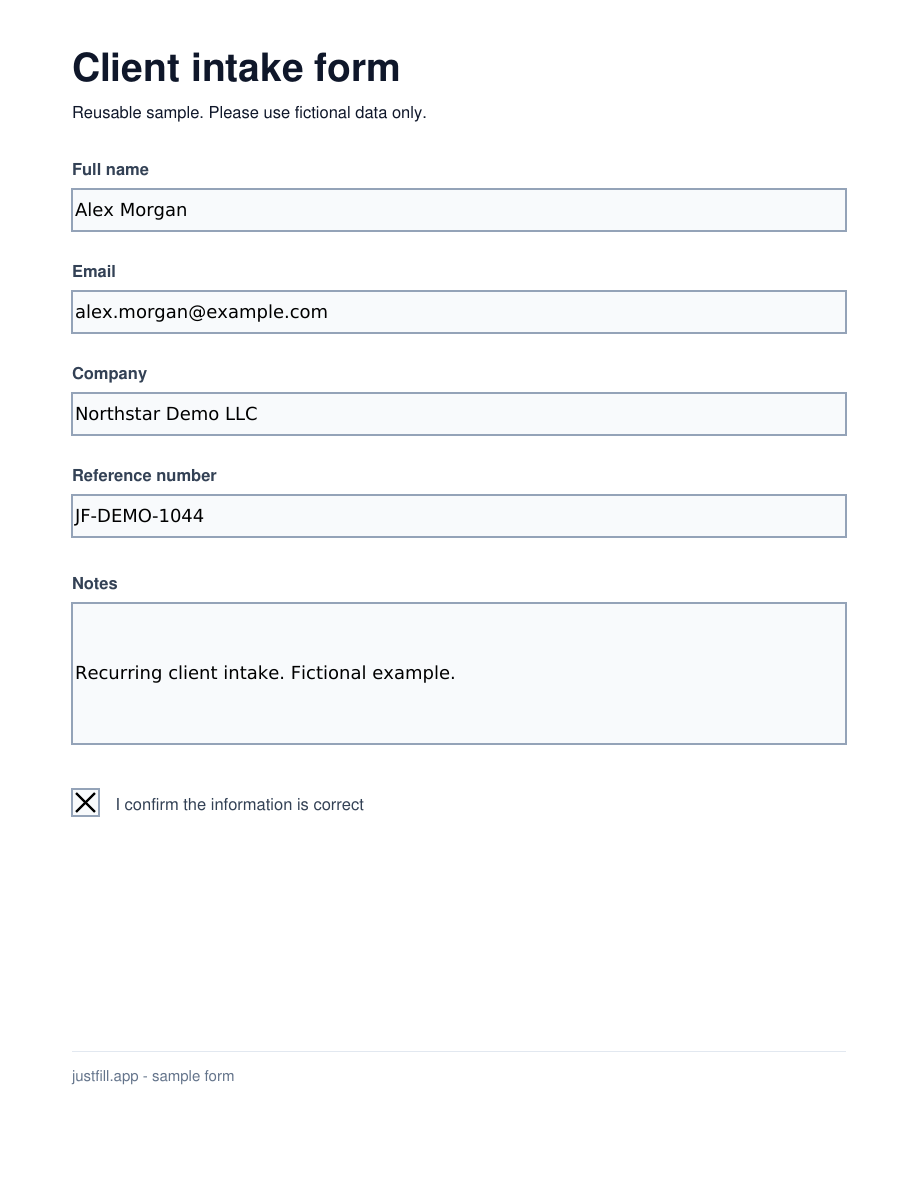
Try the same form
These sample downloads need no account. To convert your own PDF, build and preview fields free; a Starter, Pro or Business plan unlocks interactive export.
Create a blank form for your recipient
- Open the flat sample above, or upload your own PDF.
- Draw the fields, or use Detect Layout within your account's allowance. Review every position and field type.
- Leave answers empty, open Download options and choose "Make it fillable" (or "Download as fillable PDF" for an existing interactive form). Use a compatible viewer such as Adobe Acrobat Reader to test typing, checking and saving.
Reuse it for your next client
Keep the blank fillable PDF as your master and send a fresh copy for each client. Your recipient can complete the exported file without a JustFill account. When you prepare the same form repeatedly in JustFill, save the reviewed layout in your account and reuse it for new values. Monthly plans add recurring processing and clean-output capacity.
Have a spreadsheet of clients? See one PDF per row.Watch the setup, then reuse it
Follow the real editor walkthrough: draw the fields on this blank source, save the layout, and prepare separate copies for two fictional clients. The 1:55 tutorial has on-screen instructions and English captions.
Watch: a scanned form becomes a fillable form
1 minute 41 seconds on a synthetic permit worksheet: detect the fields on a scan, save the layout as a template, fill it from pasted notes, export a PDF with real form fields, and reuse the template for the next job. Detection is probabilistic, so you review the fields before you send the form out.
Need to fill the same PDF for a list of records?
After checking the PDF fields, import your Excel or CSV and prepare one copy per row. Review the drafts and download the approved PDFs together in a ZIP.
Fill a reusable PDF template from Excel
How to convert a PDF to a fillable form
Build and review fields for free, with fair-use limits on AI detection. Choose an interactive export for recipients or a flattened PDF for completed answers.
Upload the PDF you want to convert
Drag any PDF into the browser — a scanned paper form, a document exported from Word or Excel, a flat PDF downloaded from a website, or even a photograph of a printed form saved as PDF. Nothing is uploaded to any server at this stage; the file is rendered in your browser for preview.
Let AI detect the fillable areas
Click "Detect Layout" within your account's allowance to identify input lines, boxes, checkboxes, and table cells on flat PDFs or scans. Free accounts have fair-use limits; paid plans add recurring capacity. Review detected fields before exporting, especially on complex layouts.
Or draw the fields manually for free
Prefer to draw fields yourself? The free tier lets you click and drag rectangles over every area that needs to be filled. Name, address, date, signature line — just draw a box where each one goes. No AI credits used, no limits on the number of fields.
Review and adjust every field
Every field is draggable and resizable. Reposition, shrink, or delete any field AI created. Add missed fields manually. Rename fields so paste-fill knows where each value belongs. What you see is exactly how the final fillable PDF will look.
Fill in data — type, paste, or dictate
Type values into each field, or paste a block of data and let AI map values to the right fields by name. Voice dictation in five languages is built in — click the mic, speak, and the transcription lands in the active field.
Choose an interactive or a completed PDF
Choose "Download as fillable PDF" when your recipient needs clickable fields. Leave answers empty to create a blank form, or keep values editable in a completed copy. Monthly plans (from $19 Starter) unlock interactive export. Choose "Download Filled PDF" for a flattened completed document; your first clean flattened result is free.
Ways to convert a PDF to fillable — compared
There are several ways to convert a PDF into a fillable form. Here's how the common options stack up.
| Method | Difficulty | Cost | Works with scans | Flat PDF support | Auto field detection | Reusable templates | No install |
|---|---|---|---|---|---|---|---|
| JustFill | Easy | Free preview / from $19/mo | |||||
| Adobe Acrobat Pro (Prepare Form) | Medium | $19.99/mo (annual) | |||||
| Word developer form controls | Hard | Free (with MS Office) | |||||
| LibreOffice Draw | Hard | Free | |||||
| Manual (print, fill, scan) | Tedious | Free (time cost) |
Common conversion scenarios
Whatever the source, JustFill converts it to a fillable form without recreating the document from scratch.
Convert a scanned paper form to fillable
Scanned or photographed forms are just images saved as PDF — they have no interactive fields. JustFill treats them as images and lets you draw fields on top or have AI detect the input areas automatically. No OCR setup required.
Convert a Word export to a fillable PDF
You saved a Word document as PDF but now you need recipients to fill it in. Upload the PDF to JustFill and convert it into a fillable form without going back to Word's developer tools — faster and works on any device.
Convert a flat government or tax PDF
Downloaded a PDF from a government website that turned out not to be interactive? Convert it once, save as a template, and reuse the layout every time you need to fill the same form.
Convert a legacy PDF without AcroForm fields
Many older PDFs were never designed with interactive form fields. Rather than recreating the document in Word, add fields visually with JustFill and the original formatting is preserved exactly.
Convert a multi-page form to fillable
Long forms with tables, checkboxes, and signature areas across multiple pages are tedious to set up manually. AI field detection runs across the entire document and creates fields on every page.
Convert a password-protected flat PDF
If you have the open password for a protected PDF but it has no fillable fields, JustFill lets you add fields on top of the rendered image. The original file stays intact; the filled version is a new PDF.
AI field detection — the fast path
Click one button and the engine reads your PDF like a human would — spotting input lines, checkboxes, signature areas, and table cells across every page. On a long form this turns 20 minutes of manual work into under a minute.
Every detected field is editable. If the AI misses a field or places one slightly off, drag, resize, or redraw it before filling.
Manual drawing — the free path
For short forms or when you want precise control, draw each field by clicking and dragging a rectangle. This is the permanent free workflow — unlimited fields, and your first clean flattened download is free (then a $7 7-day pass unlocks 5 more clean flattened exports, or Starter unlocks unlimited fillable PDFs).
Save the reviewed layout as a template in your account. Keep the original blank PDF and reopen that same file for the next set of values.
Free vs. Paid: what do you need?
Free Plan
$0 / forever
- Convert any PDF — scanned, flat, or exported
- Draw fields manually + AI field detection
- Type or paste values into fields
- First clean flattened download free (then a $7 5-fill 7-day pass)
- Save reviewed field layouts as reusable templates
Great for occasional conversions and short forms.
Paid Plans
from $19 / month
- Everything in Free, plus:
- 125 clean output pages/month on Starter
- Interactive AcroForm export with clickable fields
- AI data mapping from pasted text
- Voice dictation in 5 languages
- Higher page and file-size limits
Best for high-volume conversion or long, complex forms.
Frequently Asked Questions
Related Guides
Make a PDF Fillable
Create a fillable PDF from Word, Excel, or a scanned paper form.
Adobe Fill & Sign Alternative
Why users are switching after Adobe retired the Fill & Sign mobile app.
Free PDF Form Filler
Fill and preview for free; your first clean download has no watermark.
How to Make a PDF Fillable
Step-by-step comparison of Acrobat, Word, Mac, Google Docs, and browser tools.
Make Fillable PDF from Word
Convert a DOCX or Word-exported PDF into an interactive AcroForm in minutes.
Best Fillable PDF Creators
Side-by-side comparison of online and desktop fillable PDF form builders.
Fillable PDF in Adobe Acrobat
How Acrobat Prepare Form works and when a browser AI form builder is faster.
Create a Fillable PDF on Mac
Why macOS Preview only fills existing fields and how to add real AcroForm fields on Mac.
Add Checkboxes & Text Fields
Place interactive checkboxes, text boxes, and signature fields on any static PDF.
Preparing fillable PDFs for clients? See how freelancers and agencies use JustFill.
For business teams: turn recurring PDFs into reusable workflows
Excel → Existing PDF
Turn each spreadsheet row into one reviewed PDF and export the approved records as a ZIP.
Vendor Packet Automation
Automate vendor onboarding, supplier setup, and customer account PDFs.
Logistics Packet Automation
BOL, CMR, customs and freight packet workflows for forwarders and 3PLs.
Build your first PDF form — free.
Upload your PDF and build a reviewed layout in your browser. Test a free watermarked interactive sample, or unlock clean clickable AcroForm exports on Starter ($19/mo) or the $7 pass.
Upload your form
Choose a PDF, a Word file or an image from your files, or photograph a paper form.
PDF, Word (.docx), JPG, PNG, WebP, HEIC, GIF and BMP. Free account required, no credit card.
Your first download is free, with no watermark. After that: a watermark, or a $7 one-time pack (5 clean PDF downloads + 25 AI credits). AI detection covers up to 15 pages per run.
By uploading, you confirm you have the legal right to use this document.
Free account. No credit card required. GDPR compliant.