Adobe Fill & Sign discontinued in 2025? Try a browser alternative
Adobe retired the Fill & Sign mobile app. JustFill upgrades the Fill & Sign workflow — snap a photo of a paper form or upload a scanned, flat, or complex PDF, and AI places the fields for you instead of tapping in every spot by hand.
Includes built-in Draw, Type (cursive), or Upload Signatures, AI auto-fill, and reusable templates — right in your mobile or desktop browser.
Upload your form
Choose a PDF, a Word file or an image from your files, or photograph a paper form.
PDF, Word (.docx), JPG, PNG, WebP, HEIC, GIF and BMP. Free account required, no credit card.
Your first download is free, with no watermark. After that: a watermark, or a $7 one-time pack (5 clean PDF downloads + 25 AI credits). AI detection covers up to 15 pages per run.
By uploading, you confirm you have the legal right to use this document.
Free to use. No credit card. No software to install.
Last updated: June 2026
Is Adobe Fill & Sign discontinued? Official status
Yes — officially. Adobe discontinued the dedicated Fill & Sign mobile app in 2025. The standalone app no longer receives updates or support, and Adobe's official migration path directs users to the Acrobat Reader mobile app for Fill & Sign workflows. As of 2026 the app is no longer available to download from the App Store or Google Play.
- Before 2025 — Adobe Fill & Sign was a free standalone app for iOS and Android for filling and signing PDF forms on a phone.
- 2025 — Adobe retires the app and folds the Fill & Sign feature into the Acrobat Reader mobile app. The standalone app stops receiving updates and is removed from app stores.
- 2026 — Adobe's help pages point former Fill & Sign users to Acrobat Reader (free tier) or Acrobat subscriptions; the old app is not coming back.
That matters if your main workflow was quick form filling: open a PDF, place text, add a signature image, and download a completed copy. JustFill focuses on that specific workflow in the browser, with stronger support for scanned and flat PDFs that do not contain embedded AcroForm fields.
Looking for Adobe Fill & Sign with AI?
Adobe Fill & Sign never had AI — every field was placed by hand, one tap at a time, and the retired app gained no AI features before it was discontinued. Adobe's current AI offering, Acrobat AI Assistant, is built for a different job: it summarizes documents and answers questions about their content. It does not detect form fields on a scanned or flat PDF and fill them for you, and it sits in the $24.99/month Acrobat Studio tier.
If what you actually want is AI-assisted form filling — upload a PDF, have the fields found for you, and type or paste your data — that is exactly what JustFill does. Its AI analyzes the page image, so it works on scanned forms, photographed documents, and flat PDFs without embedded fields, where Adobe's tools either grey out or make you place every box manually. It can also map pasted data to the right fields automatically and save the layout as a reusable template.
In short: Acrobat AI Assistant reads documents, JustFill fills them. If you searched for "Adobe Fill and Sign AI", the feature you are imagining lives here — see how AI field detection turns any PDF into a fillable form, or read the step-by-step guide to making a PDF fillable.
Used Fill & Sign on a Long Form? Hundreds of Blanks Without Hundreds of Taps
Fill & Sign has you place every text box by hand, so a multi-page application or a scanned paper form means one tap per blank. JustFill proposes a field for each blank on the page and you correct the exceptions.
How it works on a long form
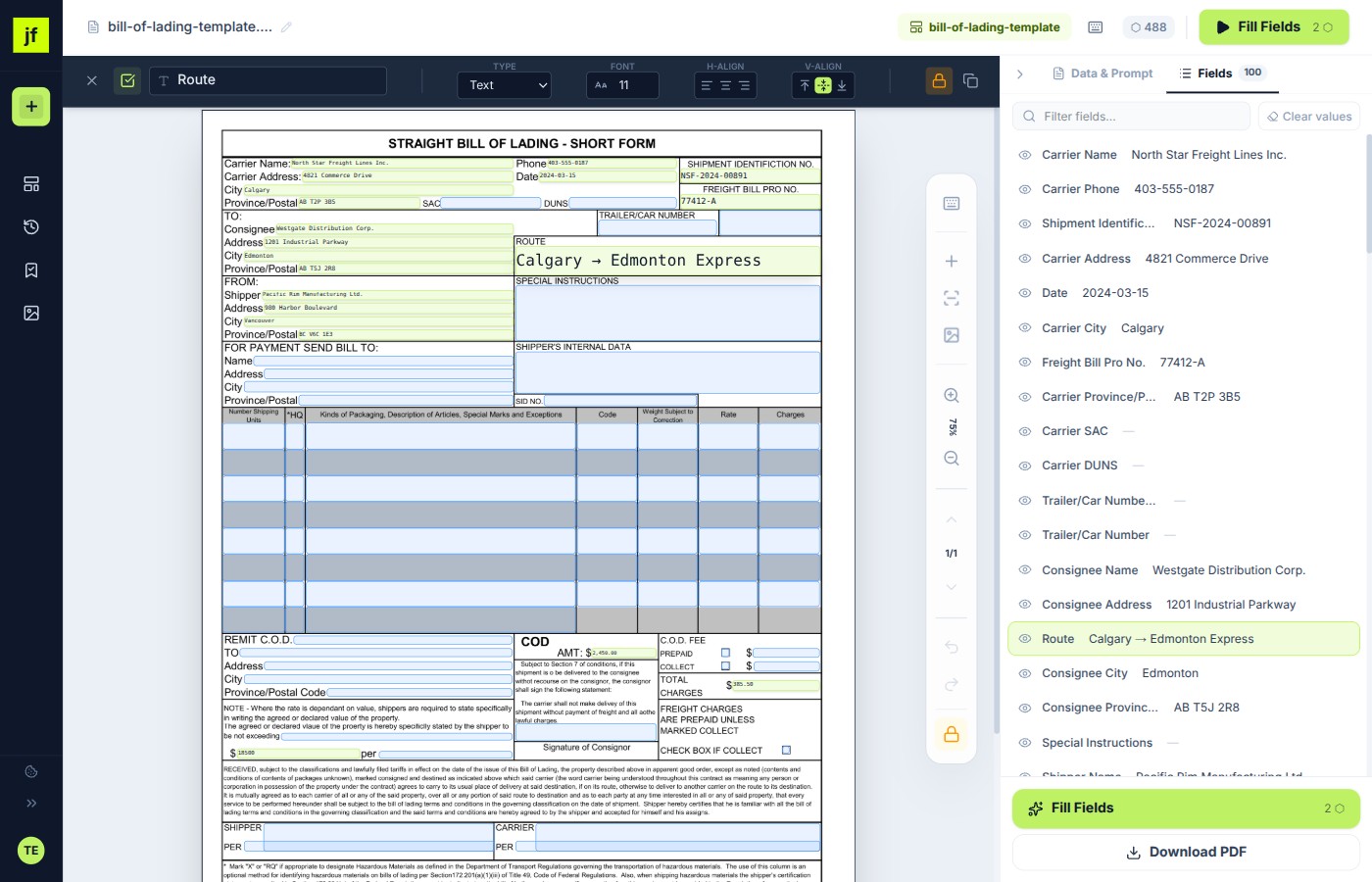
- Upload the scan or flat PDF and preview the detected fields on your own file before you decide anything.
- Review the fields: on a long form expect to delete a few false hits and add a few missed blanks. Drag, resize or redraw anything that is off.
- Type or paste your data. Your first clean download has no watermark; later downloads carry a watermark until you buy a pack or a plan.
- If you save the layout as a template, the next copy of the same form is a paste, not a rebuild.
Need more clean downloads, or a PDF with real clickable fields to send to other people? A $7 one-off pack adds 5 clean downloads, and monthly plans start at $19 and include interactive PDF export (see make a PDF fillable and convert a PDF to a fillable form). See pricing.
Six reasons people are switching
Adobe Fill & Sign covered a narrow slice of form work. Here's what JustFill does differently.
The mobile app is gone
Adobe retired the Fill & Sign mobile app in 2025 and now directs users to the Acrobat Reader mobile app. If you relied on the dedicated Fill & Sign app, you need a replacement — JustFill runs in any mobile browser with no install.
Works on scanned and flat PDFs
On password-protected or restricted PDFs, Adobe greys the tools out entirely. And on scans or flat forms it works only one tap at a time — you place every field by hand. JustFill draws fields on top of any PDF — scans, flat forms, or exported Word documents — and can auto-detect them for you.
No Acrobat subscription required
Adobe's Fill & Sign replacement path leads into Acrobat subscriptions starting at $12.99/month. JustFill lets you draw fields, fill, preview, and use fair-use AI detection for free; plans from $19/month add recurring capacity.
AI detects fields automatically
Drawing every field by hand on a 5-page form is tedious. On paid plans, JustFill analyzes your document and creates fillable fields for you — text lines, checkboxes, signature areas, even in complex tables. You review and adjust, then fill.
Reusable templates for recurring forms
Every time you open the same form in Adobe you place fields again. JustFill saves your field layout as a template. Next month, upload the new PDF and the fields appear in the right place — you just fill in the new data and download.
Voice dictation built in
JustFill includes voice dictation in English, Polish, German, French, and Spanish. Click the microphone, speak your data, and it's transcribed into the right fields. No equivalent feature in Adobe Fill & Sign.
JustFill vs Adobe's form-filling options
A side-by-side look at how the options compare on availability, cost, and what each one can actually do.
| Option | Availability | Cost | Works on mobile | Scanned PDFs | Flat PDF (no AcroForm) | Reusable templates | AI field detection | Browser only |
|---|---|---|---|---|---|---|---|---|
| JustFill (Online) | Active | Free / from $19 | ||||||
| Adobe Fill & Sign mobile app | Retired 2025 | — | ||||||
| Acrobat Reader (free tier) | Active | Free | ||||||
| Adobe Acrobat Pro | Active | $19.99/mo (annual) |
Adobe pricing reflects published rates on adobe.com as of June 2026. Acrobat Studio at $24.99/mo adds AI Assistant; Acrobat Pro annual at $19.99/mo (monthly billing is $29.99/mo).
Common Adobe Fill & Sign problems, solved
If any of these sound familiar, JustFill handles them differently.
Fill & Sign tools greyed out
The PDF is password-protected or the author set editing/security restrictions. On a locked document Acrobat disables the Fill & Sign tools.
JustFill draws fields on top of the image — restrictions don't matter because the original is untouched until download.
"Unsupported content" error
Acrobat can't recognize the document structure — common on scans, photographs of forms, or PDFs generated from unusual sources.
JustFill treats every PDF as an image and lets you place fields anywhere, regardless of how the file was produced.
No more mobile app
Adobe retired the dedicated Fill & Sign mobile app in 2025. The migration path is to install the full Acrobat Reader mobile app.
JustFill runs in mobile Safari, Chrome, and Firefox. Nothing to install. Touch interface for drawing and typing fields.
Can't save as a reusable template
Adobe Fill & Sign has no template feature — every time you open the same form you place fields again.
Save your field layout once. Next time the same form opens, fields are already in place.
Subscription required for anything beyond basics
Acrobat Standard starts at $12.99/month, Pro at $19.99/month annually, and advanced AI features are in the $24.99/month Studio tier.
JustFill has a permanent free tier. Paid plans start lower than Acrobat Standard and include AI features Acrobat charges extra for.
Free vs. Paid
Free Plan
$0 / forever
- Upload any PDF (scanned, flat, or AcroForm)
- Draw fillable fields manually
- Type or paste data into fields
- Draw, type (cursive), or upload a signature, stamp, or logo
- First clean filled-PDF download has no watermark
Covers the core Fill & Sign workflow at zero cost.
Paid Plans
from $19 / month
- Everything in Free, plus:
- AI auto-detection of all form fields
- AI auto-mapping of pasted data to fields
- Export reusable Fillable PDFs (AcroForm) & Shareable E-Sign links
- Batch Fill from Excel/CSV & reusable templates
Cheaper than Acrobat Standard ($12.99/mo) and includes AI features Acrobat charges $24.99/mo for.
Frequently Asked Questions
Related Guides
Make a PDF Fillable
Convert any PDF — scanned, flat, or exported from Word — into a fillable form.
Convert PDF to Fillable Form
Turn static PDFs into interactive AcroForm documents with AI field detection.
Fill PDF from Excel or CSV
Auto-populate hundreds of PDFs from Excel or CSV rows and download a ZIP.
Fillable PDF in Adobe Acrobat
Compare Acrobat Prepare Form with browser-based AI field detection.
Best Fillable PDF Creators
Side-by-side comparison of online and desktop fillable PDF form builders.
Make Fillable PDF from Word
Upload a DOCX or Word-exported PDF and convert blank lines into fillable fields.
For business teams: turn recurring PDFs into reusable workflows
Excel → Existing PDF
Turn each spreadsheet row into one reviewed PDF and export the approved records as a ZIP.
Vendor Packet Automation
Automate vendor onboarding, supplier setup, and customer account PDFs.
Logistics Packet Automation
BOL, CMR, customs and freight packet workflows for forwarders and 3PLs.
The Fill & Sign replacement that actually works.
Upload your PDF, draw or auto-detect fields, add your signature, and download without an Adobe subscription or app install. Your first clean download has no watermark.
Upload your form
Choose a PDF, a Word file or an image from your files, or photograph a paper form.
PDF, Word (.docx), JPG, PNG, WebP, HEIC, GIF and BMP. Free account required, no credit card.
Your first download is free, with no watermark. After that: a watermark, or a $7 one-time pack (5 clean PDF downloads + 25 AI credits). AI detection covers up to 15 pages per run.
By uploading, you confirm you have the legal right to use this document.
Free account. No credit card required. GDPR compliant.
Working with a different PDF?
The same editor handles any document you upload — not just the forms in our library.
Make any PDF fillable
Turn a flat, scanned or exported PDF into a fillable form — draw the fields once, or let AI detect them.
Convert a PDF to a fillable form
Keep the original layout and get real, clickable form fields back out the other side.
Make a fillable PDF from Word
Upload the .docx, we convert it to a PDF and detect the blanks you drew, then export real form fields.
How to create a fillable PDF document
Step by step for Acrobat, Word, Google Docs, Mac and a browser tool, with a tested example and what each one costs.
Fill a PDF form online
Type straight onto any PDF in the browser. No Adobe or install; your first clean download has no watermark.
Free PDF filler — first clean download
Upload a form and preview its fields before paying. Your first clean download has no watermark, and no credit card is required.
Adobe Fill & Sign alternative
Adobe retired Fill & Sign. This is the free browser replacement for the same job.
Fill PDF forms from Excel or CSV in batch
Map spreadsheet columns to any PDF form and generate hundreds of filled PDFs in one ZIP.