Fill PDF Form Online
Upload any PDF. AI detects every field. Fill in your data and download the completed form in seconds — no Adobe, no install.
Upload your form
Choose a PDF, a Word file or an image from your files, or photograph a paper form.
PDF, Word (.docx), JPG, PNG, WebP, HEIC, GIF and BMP. Free account required, no credit card.
Your first download is free, with no watermark. After that: a watermark, or a $7 one-time pack (25 clean PDF downloads + 25 AI credits). AI detection covers up to 15 pages per run.
By uploading, you confirm you have the legal right to use this document.
Free to fill, edit & preview any PDF. Your first clean download is free — then a small one-off pack unlocks 25 more clean exports.
No credit card required. Fill your first PDF in under a minute.
How to Fill a PDF Online in 3 Steps
Upload your PDF
Drag and drop a PDF up to 50 MB — scanned paper, flat documents from Word, or interactive forms. The file is uploaded when you use server-backed form filling or AI processing.
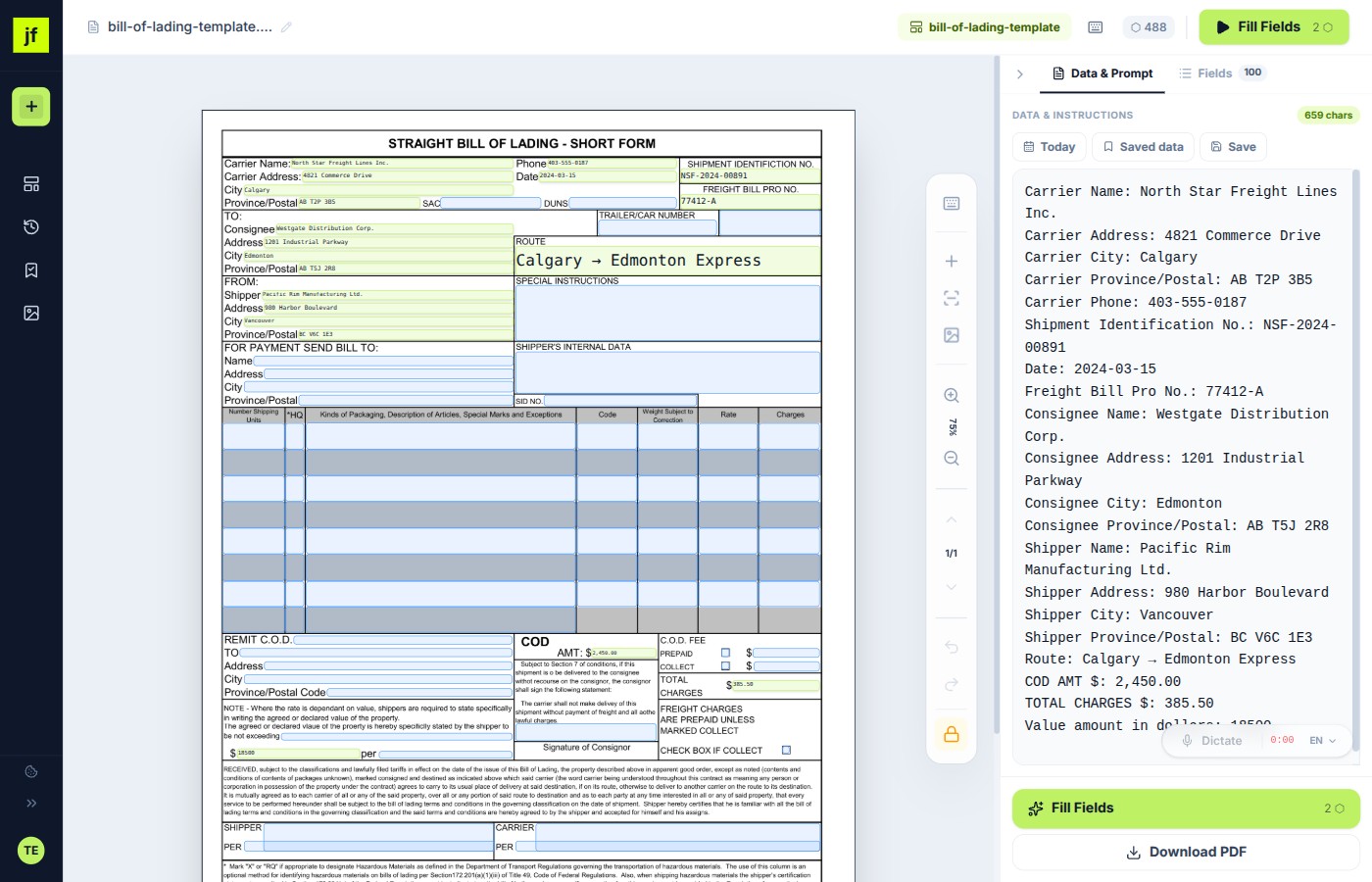
AI detects all fillable fields
JustFill analyzes your document and places text fields, checkboxes, and date inputs automatically. No manual drawing needed. You can also draw fields by hand for free — no AI credits required.
Fill in your data and download
After signing in, type your data into each field (or use voice dictation). Click "Download" to get a clean PDF with no quality loss — your first clean download is free. The original formatting stays perfect.
Works With Any PDF
Most online PDF fillers only handle interactive forms. JustFill works with every type of document you will encounter — from scanned paper to complex government filings.
Scanned Paper Forms
Photographed or scanned documents. AI reads the image and detects every blank field automatically.
Flat PDFs Without Form Fields
PDFs exported from Word or design tools that have blank lines but no interactive inputs.
Government Forms (W-9, I-9)
Tax, immigration, and federal forms that are notoriously hard to fill with free tools.
Insurance Forms
Claims, applications, and certificates of insurance — multi-page forms with dense layouts.
Medical Intake Forms
Patient registration, HIPAA authorization, and medical history questionnaires.
Construction Forms (WH-347)
Certified payroll, daily logs, and compliance documents used on job sites.
Why JustFill vs Adobe Acrobat
Adobe Acrobat costs $22.99/month and requires a desktop installation. JustFill fills PDFs online free in your browser — no downloads, no subscriptions.
Frequently Asked Questions
Common questions about filling PDF forms online with JustFill.
Ready to fill your PDF?
Create a free account and complete your first PDF form online in under a minute. No credit card — your first clean download is free.
GDPR compliant. No credit card required.
Related Guides
Free PDF Form Filler
Complete guide to filling PDFs online for free — features, supported formats, and tips.
How to Fill Out a PDF Form
Step-by-step guide to filling out any PDF form directly in your browser.
Make a PDF Fillable
Turn any static PDF into a fillable form — from Word exports, scans, or flat documents.
For business teams: turn recurring PDFs into reusable workflows
Excel → Existing PDF
Turn each spreadsheet row into one reviewed PDF and export the approved records as a ZIP.
Vendor Packet Automation
Automate vendor onboarding, supplier setup, and customer account PDFs.
Logistics Packet Automation
BOL, CMR, customs and freight packet workflows for forwarders and 3PLs.