Make a PDF Fillable Online for Free
Make a PDF fillable free or create a fillable PDF free from any scanned form, Word export, or flat PDF. Build and preview a PDF fillable form free in your browser, save a reusable template, or fill in batch from Excel.
Upload your form
Choose a PDF, a Word file or an image from your files, or photograph a paper form.
PDF, Word (.docx), JPG, PNG, WebP, HEIC, GIF and BMP. Instant field preview in browser — no credit card required.
First hand-filled PDF (up to 15 pages) is free with no watermark. Need more or AI Auto-Fill? Grab the $7 7-Day Pass (25 clean PDF downloads + 25 AI credits, $7 credited toward $19/mo Starter).
By uploading, you confirm you have the legal right to use this document.
First clean flattened download is free; build and preview fields free. Clean interactive AcroForm export: $7 7-Day Pass (25 exports, $7 credited toward Starter within 7 days) or Starter ($19/month).
No credit card. No software to install.
See the real before-and-after PDF exampleDownload the source and the result
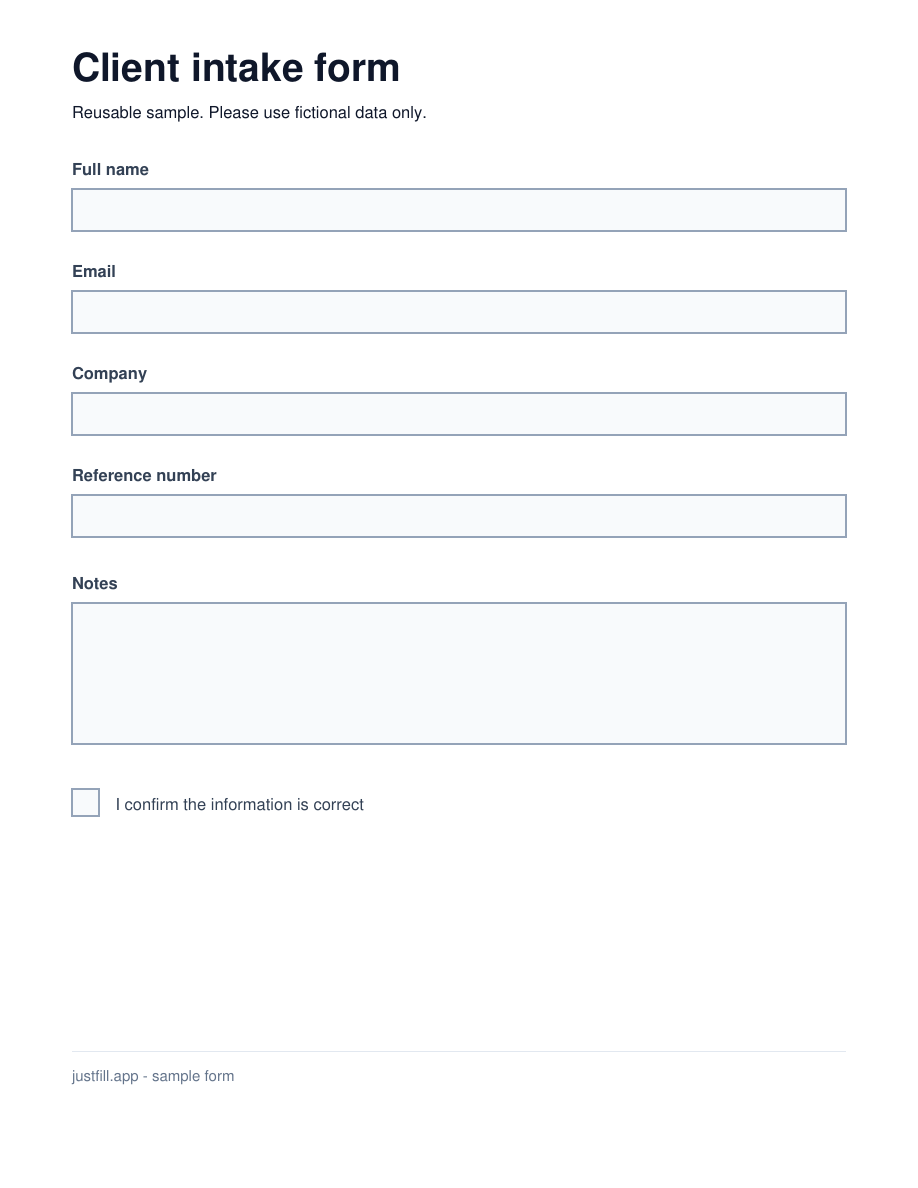
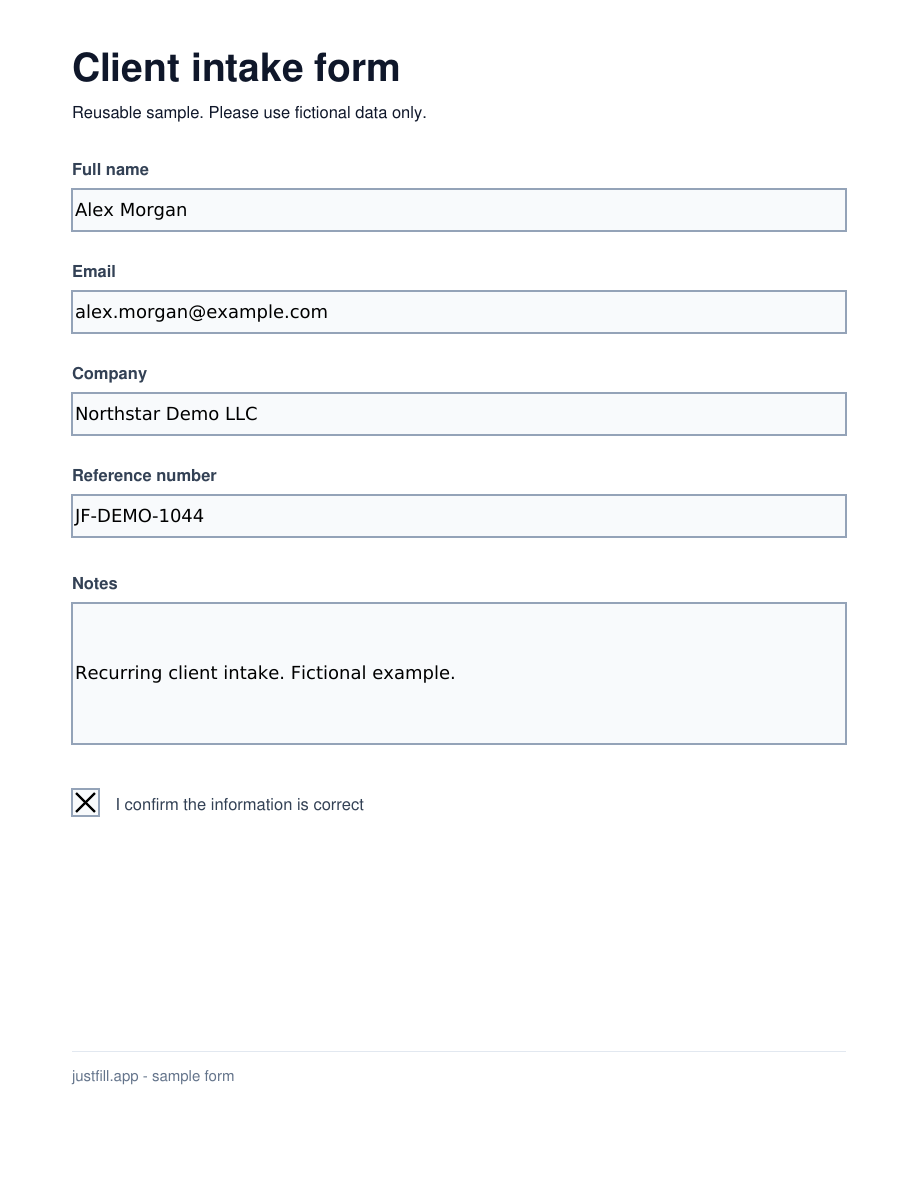
A real flat PDF converted to a fillable form
This client intake starts with no interactive fields. We manually positioned five text fields and one checkbox, then exported it through JustFill. Download the blank fillable result to try typing into it, or inspect the completed copy with fictional Alex Morgan data.
Try the same form
These sample downloads need no account. To convert your own PDF, build and preview fields free; exporting interactive fields is included in Starter ($19/month) or unlocked with a $7 7-Day Pass (25 clean exports, $7 credited toward Starter).
Create a blank form for your recipient
- Open the flat sample above, or upload your own PDF.
- Draw the fields, or use Detect Layout within your account's allowance. Review every position and field type.
- Leave answers empty, open Download options and choose "Make it fillable" (or "Download as fillable PDF" for an existing interactive form). Use a compatible viewer such as Adobe Acrobat Reader to test typing, checking and saving.
Reuse it for your next client
Keep the blank fillable PDF as your master and send a fresh copy for each client. Your recipient can complete the exported file without a JustFill account. When you prepare the same form repeatedly in JustFill, save the reviewed layout in your account and reuse it for new values. Monthly plans add recurring processing and clean-output capacity.
Have a spreadsheet of clients? See one PDF per row.Watch the setup, then reuse it
Follow the real editor walkthrough: draw the fields on this blank source, save the layout, and prepare separate copies for two fictional clients. The 1:55 tutorial has on-screen instructions and English captions.
Watch: a scanned form becomes a fillable form
1 minute 41 seconds on a synthetic permit worksheet: detect the fields on a scan, save the layout as a template, fill it from pasted notes, export a PDF with real form fields, and reuse the template for the next job. Detection is probabilistic, so you review the fields before you send the form out.
How to Make a PDF Fillable Free & Create a Fillable PDF Free in 6 Steps
Build and review fields free on a scanned form or a document from Word. Download your first clean flattened PDF free, or export clickable AcroForm fields with a $7 7-Day Pass (25 exports, $7 credited toward Starter) or Starter ($19/month).
Upload Your PDF
Open JustFill and upload any PDF — a scanned paper form, a document exported from Word or Excel, or even a photo of a printed form. JustFill renders it in your browser so nothing is uploaded until you choose to process it.
Create Fillable Fields
Use the Draw tool to click and drag rectangles over every area that needs to be filled in. Name, address, date, signature line — just draw a box where each one goes. This is completely free and takes a few minutes for most forms.
Or Let AI Detect Fields Automatically
Click "Detect Layout" with fair-use limits to create fields automatically. It detects input lines, checkboxes, text areas, and table cells — even on scanned documents. Paid plans add recurring capacity, and you can adjust every field.
Fill In Your Data
Type directly into each field, or paste all your data at once and let AI map values to the right fields. You can also dictate data by voice. Every field is draggable and resizable so you can fine-tune placement.
Choose Your PDF Output
Download a flattened filled PDF when you want the entered values baked into the page. Your first clean flattened result is free. Use "Download as fillable PDF" when the recipient must be able to click and edit real AcroForm fields: it is included in Starter ($19/month) or unlocked with a $7 7-Day Pass (25 clean exports, $7 credited toward Starter). Monthly plans also add recurring processing and clean-output capacity.
Save as a Reusable Template
Save the reviewed layout as a template in your JustFill account. Keep the original blank PDF as your master and reopen that same file for the next set of values. Review before exporting each completed form; monthly plans add recurring processing and clean-output capacity.
Filling this form for 10, 50, or 500 clients? Don't type it one by one.
Once JustFill detects or creates your form fields, save the layout as a reusable template and import an Excel (.xlsx) or CSV spreadsheet to generate one filled PDF per row in a single ZIP.
Make Scanned PDFs, Camera Photos & Flat Image PDFs Fillable
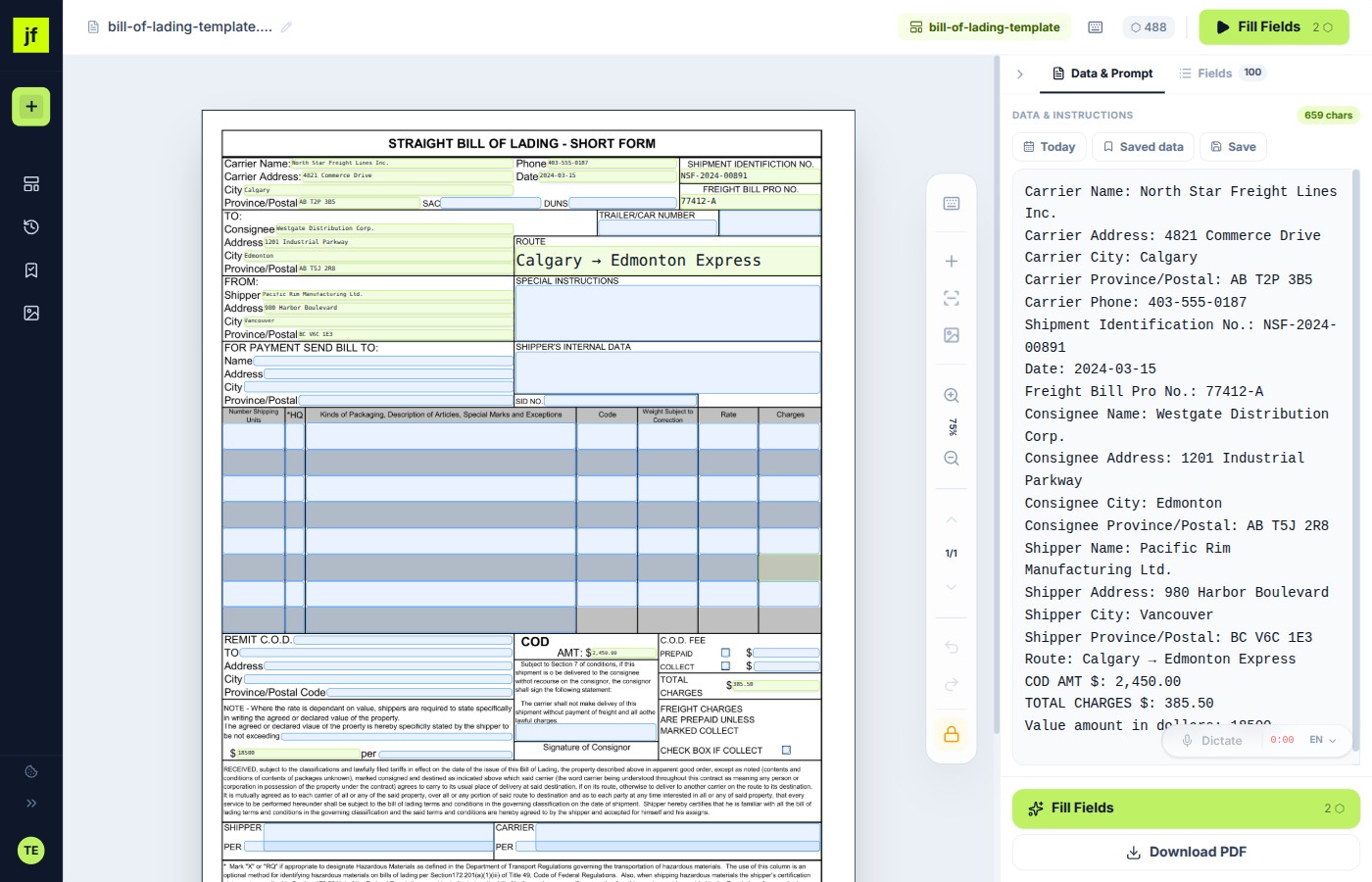
Most PDF form builders fail on scanned paper forms, faxes, and smartphone photos because the file has zero embedded text characters (textChars === 0). JustFill turns image-only PDFs into interactive forms without breaking your layout:
1. D-FINE Visual Detection on Image PDFs
Our D-FINE visual detector inspects the rendered page image to find underscores, input boxes, table cells, and checkboxes even when textChars === 0.
2. Place or Adjust Fields in 1 Click
Add a missing text field, checkbox, or signature block in 1 click, or drag and resize any detected field so your answers sit cleanly on the original scan.
3. Export Clean Filled or AcroForm PDF
Your first clean completed download is free. Export an interactive AcroForm PDF (or unlock 25 clean downloads) with the $7 7-Day Pass ($7 credited toward Starter) or $19/month Starter.
Ways to Make a PDF Fillable Free — Compared
There are several ways to make a PDF fillable free or build a PDF fillable form free online. Here's how they stack up.
| Method | Difficulty | Cost | Works with scans | Flat PDF support | From Word/Excel | Reusable templates | AI field detection | No install needed |
|---|---|---|---|---|---|---|---|---|
| JustFill (Online) | Easy | Free preview / from $19/mo | ||||||
| Adobe Acrobat Pro | Medium | $19.99/mo (annual) | ||||||
| LibreOffice Draw | Hard | Free | ||||||
| Google Docs | Medium | Free |
Common Scenarios to Create a Fillable PDF Free
No matter where your PDF comes from, JustFill makes it a free fillable PDF in your browser.
Make a Word Document Fillable as PDF
Export your Word file as PDF, upload to JustFill, and draw or auto-detect fillable fields. Faster than using Word's developer tools to add form controls, and the result works on any device.
Make an Excel Spreadsheet Fillable as PDF
Save your Excel sheet as PDF, then add fillable fields with JustFill. Perfect for order forms, timesheets, and data collection sheets where you need a clean, non-editable layout with specific fill areas.
Make a Scanned Paper Form Fillable
Scan your paper form (or photograph it) and save as PDF. JustFill works with scanned images — draw fields over the scanned areas or let AI detect them. No OCR setup required.
Make a Government or Tax Form Fillable
Downloaded a PDF from a government website that isn't interactive? Upload it to JustFill, create fields once, save as a template, and reuse it every time you need to fill the same form.
Make a PDF Fillable on Mac
JustFill runs in your browser — Safari, Chrome, or Firefox on macOS. No need to install Adobe Acrobat or any other desktop software. Upload your PDF and start creating fillable fields immediately.
Make a PDF Fillable on Your Phone
Need to make a PDF fillable from your iPhone or Android? JustFill works on mobile browsers. Upload the PDF, draw fields with your finger, fill in data, and download — all from your phone.
Create a Fillable PDF Free from Word
Have a document in Microsoft Word that you need as a fillable PDF? Export it as a PDF (File → Save As → PDF), then upload it to JustFill. Draw fillable fields on the document or let AI detect them automatically. This is faster and more reliable than using Word's built-in developer form controls, and the result works on every device and operating system.
Creating a PDF fillable form free from Word takes minutes with JustFill's Draw tool. You can save the field layout as a reusable template so you never have to set up the same form twice.
Make a PDF Fillable Free: Build a PDF Fillable Form Free
Whether you have a flat PDF, a scanned paper form, or an intake sheet downloaded from the web, JustFill lets you make a PDF fillable free and preview your field layout in the browser. Download a flattened filled result when the values should be final. An interactive AcroForm that stays editable for its recipient is included in Starter ($19/month) or unlocked with a $7 7-Day Pass (25 clean exports, $7 credited toward Starter).
Need a dedicated converter for legacy or scanned documents? Use our Convert PDF to Fillable Form Online tool to turn static files into interactive AcroForms.
How to Make a PDF Editable
"Editable" means two different things, and which one you want changes what you should do next.
You want to type on it
This is what most people mean by making a PDF editable: you have a form, you need your answers on it, and the file won't let you click anywhere. You don't need to rebuild the document — you need fields on top of it. Upload the PDF, draw a box where each answer goes (or let AI place them), type, and download. The layout of the original never changes.
You want to rewrite the text
Changing a typo in the printed body text of a PDF is a different job — that means converting the page back into editable text, which reflows the layout and often breaks the formatting of a form. If you are working with a form rather than a document, editing on top of it is almost always what you actually want, and it keeps the original intact for whoever receives it.
Turning a Scanned PDF Into an Editable PDF
A scan is a picture of a page, so there is nothing in the file to click — which is why most editors refuse to open it as a form. JustFill works on the image itself: fields sit on top of the scan at the coordinates you (or the AI) put them, so a photographed or scanned form becomes editable without OCR, without cleanup, and without retyping the document first.
The same applies to a PDF exported from Word or Excel, a fax, or a form someone printed and re-scanned. If you can see it, you can put a field on it.
Creating an Editable PDF Others Can Fill
If you are sending the form out rather than filling it in, you want the fields to survive the trip. Export as an interactive AcroForm and the file arrives with real clickable fields that your recipient can complete in a compatible PDF viewer — no JustFill account needed on their end.
Build and preview the layout for free. Monthly plans (from $19 Starter) unlock interactive AcroForm export along with recurring processing and clean-output capacity. A flattened download bakes the values in instead, which is what you want when the answers are final.
Free vs. Paid: What Do You Need?
Free Plan
$0 / forever
- Upload any PDF (scanned, flat, Word export)
- Draw fields manually + AI field detection
- Type or paste data into fields
- First clean flattened download free
- $7 7-Day Pass (25 exports, $7 credited toward Starter)
- Save field layouts as templates
Best when you fill and finalize occasional PDFs yourself.
Paid Plans
from $19 / month
- Everything in Free, plus:
- 125 clean output pages/month on Starter
- Interactive AcroForm export with clickable fields
- Hosted Share & E-Sign links (/f/token) & Excel/CSV Batch Fill
- AI auto-mapping of data to fields
- Voice dictation (multi-language)
- Priority processing
Best for high-volume form processing or complex layouts.
Frequently Asked Questions
Related Guides
Free PDF Form Filler
Upload, draw fields, and type for free. Your first clean download has no watermark.
How to Fill PDF Form Free
Step-by-step guide to filling any PDF form directly in your browser, no software needed.
How to Make a PDF Fillable
Every method compared — browser tool, Acrobat Pro, LibreOffice, Mac, Word and scans — with a checklist before you send the form.
Make Fillable PDF from Word
Upload a DOCX or Word-exported PDF and convert blank lines into clickable fields.
Best Fillable PDF Creators (2026)
Side-by-side comparison of browser and desktop fillable PDF form builders on scan support and pricing.
PDF Mail Merge from Excel
Batch-populate any fillable or flat PDF template from Excel or CSV rows into a single ZIP.
How to Create a Fillable Form in Word
Why Word Developer tab controls flatten on PDF export and how to turn a Word layout into an AcroForm.
Fillable PDF in Adobe Acrobat
How Acrobat Prepare Form works and when a browser AI form builder is faster.
Create a Fillable PDF on Mac
Why macOS Preview only fills existing fields and how to add real AcroForm fields on Mac.
Google Docs to Fillable PDF
Export your layout from Google Docs as PDF and add interactive form fields in minutes.
Make a Canva PDF Fillable
Keep your Canva design intact and place clickable text and checkbox fields on top.
Add Checkboxes & Text Fields
Place interactive checkboxes, text boxes, and signature fields on any static PDF.
Mail Merge from Excel to PDF
Step-by-step tutorial on mapping Excel or CSV columns to PDF form fields in batch.
Preparing fillable PDFs for clients? See how freelancers and agencies use JustFill.
Comparing tools first? See the best fillable PDF creators compared · Convert PDF to Fillable Form Online.
For business teams: turn recurring PDFs into reusable workflows
Excel → Existing PDF
Turn each spreadsheet row into one reviewed PDF and export the approved records as a ZIP.
Vendor Packet Automation
Automate vendor onboarding, supplier setup, and customer account PDFs.
Logistics Packet Automation
BOL, CMR, customs and freight packet workflows for forwarders and 3PLs.
Build your first PDF form — free.
Upload any document and create fields in minutes. First clean flattened download is free, or unlock clean clickable AcroForm exports on the $7 7-Day Pass (25 exports, $7 credited toward Starter) or Starter ($19/mo).
Upload your form
Choose a PDF, a Word file or an image from your files, or photograph a paper form.
PDF, Word (.docx), JPG, PNG, WebP, HEIC, GIF and BMP. Instant field preview in browser — no credit card required.
First hand-filled PDF (up to 15 pages) is free with no watermark. Need more or AI Auto-Fill? Grab the $7 7-Day Pass (25 clean PDF downloads + 25 AI credits, $7 credited toward $19/mo Starter).
By uploading, you confirm you have the legal right to use this document.
Free account. No credit card required. GDPR compliant.