How to Fill PDF Form Online Free
No paid software needed. Follow this guide to free fill out PDF forms — including scanned documents — directly in your browser.
By uploading, you confirm you have the legal right to use this document.
Free to fill, edit & preview any PDF. Your first clean download is free — then a small one-off pack unlocks 5 more clean exports.
Complete Guide: Free Fill Out PDF in Your Browser
Upload Your PDF Form
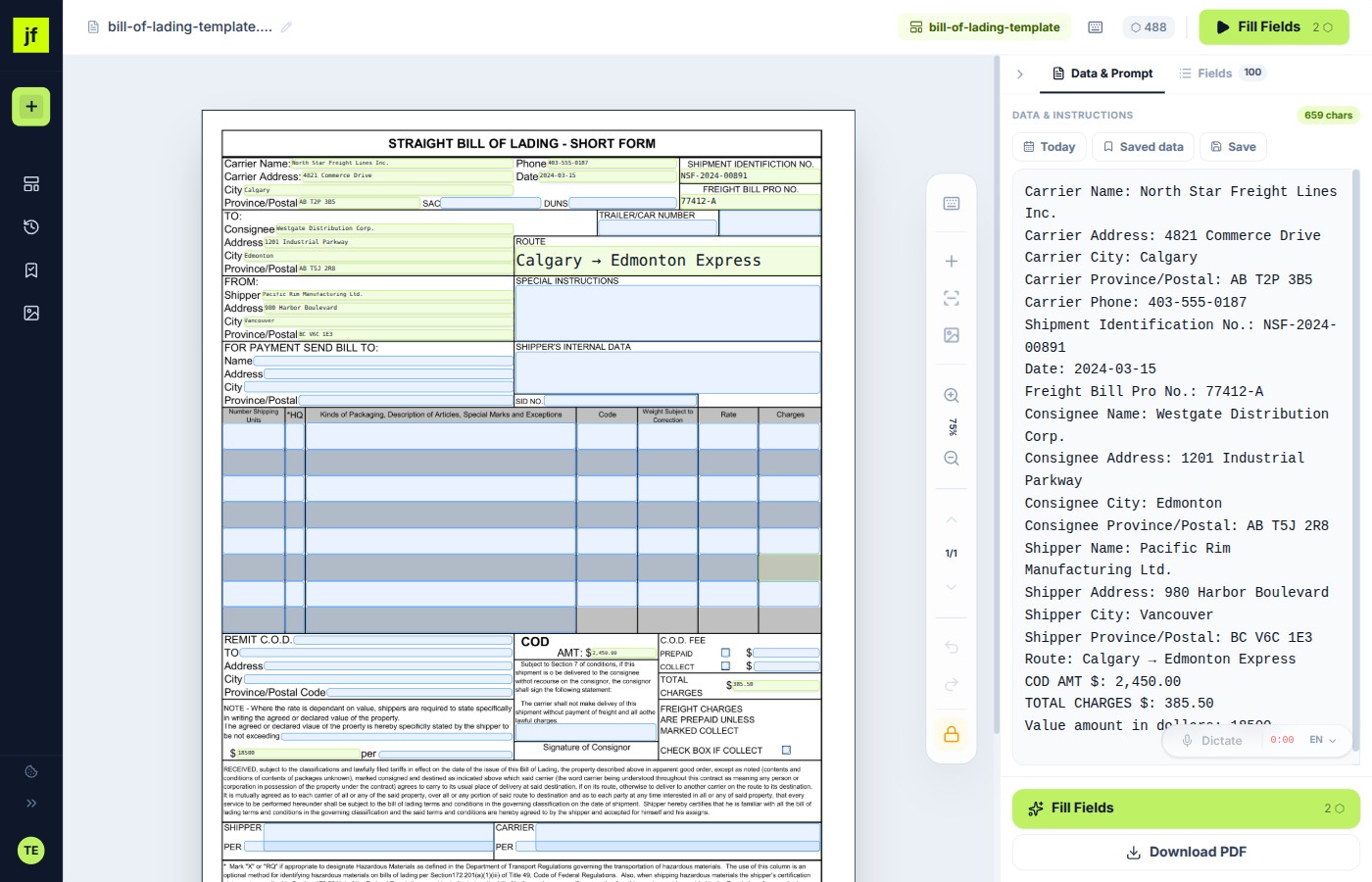
Go to the JustFill editor and upload your PDF. It can be a scanned document, a flat PDF, or an interactive AcroForm — JustFill handles them all. Your file is rendered in the browser, so nothing is sent to a server until you explicitly process it.
Create Fields (Draw or Auto-Detect)
Use the Draw tool to click and drag rectangles over each fillable area. This is completely free and uses zero AI credits. You can also click "Detect Layout" with fair-use limits to let AI find fields automatically, then draw any fields it missed.
Fill In Your Data
Click on any field and type your value. Or paste all your data into the text area and let AI map values to fields automatically. You can also use the microphone button to dictate data by voice — great for long addresses or names.
Review and Adjust
Every field is editable. Drag to reposition, resize handles to adjust dimensions, or click to edit the value. Fields are color-coded by confidence so you can quickly spot anything that needs attention.
Download Your Filled PDF
Click "Download Filled PDF" to get your completed document. The original formatting, fonts, and layout are preserved. Your first clean download is free; after that, a small one-off pack unlocks 5 more watermark-free exports.
Save as Template (Optional)
If you fill the same form type regularly (tax forms, invoices, contracts), save the field layout as a template. Next time, just upload the new PDF, paste your data, and download — fields are pre-positioned from your template.
Free vs. Paid: What's the Difference?
Free Plan
$0 / forever
- PDF uploads up to 50 MB each
- Draw fields manually + AI field detection
- Type values into fields
- First clean download free (then a one-off 5-fill pack)
- Save templates
Paid Plans
from $19 / month
- Everything in Free, plus:
- 125 clean output pages/month on Starter
- AI auto-mapping of data to fields
- Voice dictation (multi-language)
- Priority processing
Frequently Asked Questions
Related Guides
PDF Form Filler Free Online
Upload, draw fields, and type values for free. Your first clean download has no watermark.
Fill In PDF Documents Free
Fill scanned PDF forms free — learn how JustFill handles flat PDFs, scans, and AcroForms without Adobe.
How to Make a PDF Fillable
Turn any PDF into a fillable form — from Word, Excel, scanned documents, or flat PDFs.
For business teams: turn recurring PDFs into reusable workflows
Excel → Existing PDF
Turn each spreadsheet row into one reviewed PDF and export the approved records as a ZIP.
Vendor Packet Automation
Automate vendor onboarding, supplier setup, and customer account PDFs.
Logistics Packet Automation
BOL, CMR, customs and freight packet workflows for forwarders and 3PLs.
Stop struggling with PDF forms.
Fill out any PDF form in minutes — for free. No install, and your first clean download is free.